Live video from a DJI Matrice 4E kept freezing for one to four seconds at a time, several times a minute. We put our watchers on one clock and found the controller going silent: it stopped answering pings in the same seconds its video stopped arriving. Our servers, the internet link, the access point and the browser all checked out.
For a while we thought the Wi-Fi channel explained it, until the same channel ran clean for 17 minutes.
Nebli sells the platform this video runs through, so we had a stake in the answer. This is what we measured, including the part we still can't explain.
That afternoon our Live page showed a link strip, a bar that marks, in 100 ms slots, whether video is arriving. (Today the page shows a link card, with the strip one click away.) It was full of gaps. The picture froze, caught up, froze again.
The setup: a Matrice 4E on the ground, an RC Plus 2 controller on home Wi-Fi, pushing about 6 Mbps of H.264 at 60 frames a second over RTMP to our ingest.
No single vantage point could tell us where the video was getting lost, so we watched from four at once:
Here is one freeze, at 3:44:41 PM:
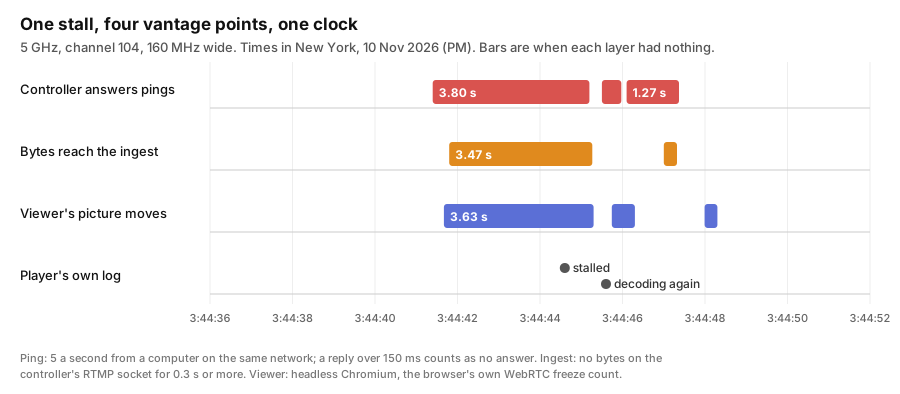
The controller stopped answering pings at 3:44:41.4 and stayed silent for 3.80 s. Our ingest stopped getting bytes 0.4 s later, for 3.47 s. The browser counted a 3.63 s freeze.
So the pings stopped in the same seconds as the video. Whatever was going on held more than the video stream: the controller stopped answering us too.
It also mostly happened while streaming. With the aircraft off and nothing streaming, the controller was unreachable for 6.9 s in 9.5 minutes. While streaming, it was about 110 to 130 s in every 10 minutes.
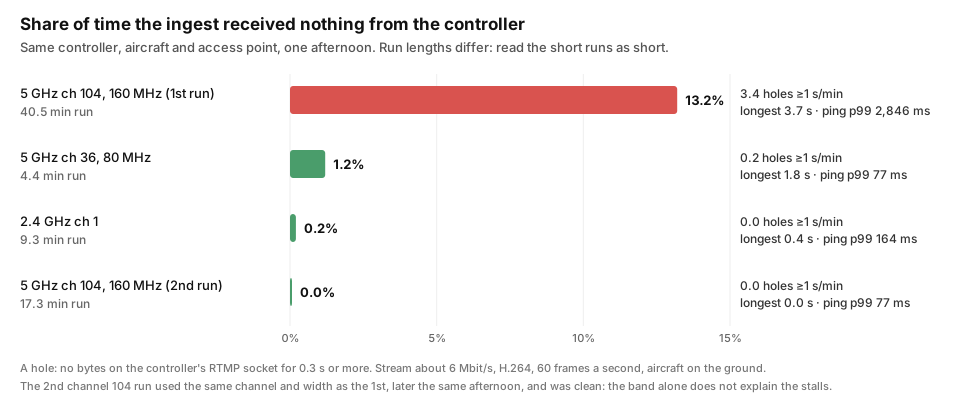
The bad stretch was on 5 GHz channel 104 at 160 MHz, which sits outside the Wi-Fi bands DJI's specifications page lists for this controller. We tried other settings, and they looked better:
| Wi-Fi setting | Aircraft | Run | Holes of 1 s or more | Time in holes | Ping p99 |
|---|---|---|---|---|---|
| Channel 104, 160 MHz (3:14 to 3:55 PM) | beside the controller | 40.5 min | 3.4 a minute | 13.2% | 2,846 ms |
| Channel 36, 80 MHz | across the room | 4.4 min | 0.2 a minute | 1.2% | 77 ms |
| 2.4 GHz, channel 1 | beside the controller | 9.3 min | none | 0.2% | 164 ms |
| Channel 104, 160 MHz again (5:04 to 5:21 PM) | across the room | 17.3 min | none | 0.0% | 77 ms |
That last row ended the theory. Same access point, same channel, same width as the bad run, and not a single hole in 17 minutes, then 8 more clean minutes after it. The aircraft was across the room, where an earlier run on that channel had been the worst of the day: 29% of the time in holes. The channel didn't cause this on its own, and neither did distance.
What changed between the two runs on channel 104: the access point's radio went to channel 36 and back, so every device on it reconnected, and for a while we held the controller to that one access point. We don't know which of those mattered, or whether it was something else.
Watching this closely also turned up a handful of things in our own product that made the freezes look worse than they were, from an ingest that drained the controller's backlog too fast to a link indicator that flipped on every blip. All of them are fixed.
One controller, one aircraft, one home network, one afternoon, with the aircraft on the ground. The runs were back to back and unequal. We found where the video was getting lost, not why the controller went quiet.
All of this ran on Tuesday, 10 November 2026, between about 3:10 PM and 5:30 PM New York time, from one Mac on the same home network as the controller. The aircraft stayed on the ground. Every watcher wrote plain text files with a timestamp on each line, and every timestamp except the controller's own log came from the Mac's clock.
The Mac pinged the controller's Wi-Fi address every 200 ms with the system ping, printing the wall-clock time of each reply:
ping --apple-time -i 0.2 <controller address> > ping-rc.txtBeside it, two controls ran the same way: the gateway, and another device on the same access-point radio. If those stalled at the same moment, the problem would be the network, not the controller. They never did.
The blackout rule: a reply slower than 150 ms counts as a blackout. When the controller stops answering, the pings queue up and come back together, so you see one very slow reply followed by a run of slightly less slow ones. We count that run as one blackout, and its length is the slowest (first) reply's round-trip time. In code (compare.py and timeline.py):
if rtt > 150 ms: start a blackout of length rtt / 1000 s;
swallow following replies while each is also > 150 ms and smaller than the one beforeFor the afternoon we ran Nebli's ingest service on the same Mac, with the controller pushing RTMP straight to it over the LAN, so that nothing between the controller and the ingest but the Wi-Fi and the access point could hold bytes. The ingest was built with a debug trace, turned on with one environment variable (CAMERA_INGEST_DEBUG_TRACE=1). On every read from the controller's socket it compares the time with the last read that returned bytes, and if the gap is 0.3 s or more it logs one line:
[dbg] SOCKET IDLE <peer>: nothing arrived for 3.47s, then 2896 bytes in one readThe line is written when the bytes finally arrive, so the hole's start is the line's time minus its length. The service logs JSON with an RFC 3339 timestamp from the Mac's clock. A "hole" in the post means one of these lines; "holes of 1 s or more" are the lines with a gap of at least a second.
The controller (an RC Plus 2) runs Android. We attached to it with adb over the network and streamed its system log to a file, passing every line through a small Perl filter that masks anything shaped like a stream key, a token, a password or a signed URL before it touches the disk:
adb -s <controller>:5555 logcat -v threadtime -T 20 | perl mask.pl >> rc-logcat.logA second loop over the same adb link sampled the controller's own view of its RTMP connection ten times a second (bytes sent on its Wi-Fi interface, and the kernel's TCP state for the connection to port 1935):
while true; do t=$(date +%s.%N); set -- $(grep wlan0: /proc/net/dev); echo "$t ${10} $(ss -tinoH state established '( dport = :1935 )' | tr '\n' ' ')"; sleep 0.1; doneBoth run over the same Wi-Fi link we were measuring, so they added a small amount of traffic to it. The controller's clock was 1.6 to 1.8 s behind the Mac's (measured at the start of each run by reading its clock between two Mac timestamps); lining its log up with the others means shifting it by that amount.
A headless Chrome, driven by Playwright and signed in as a read-only viewer, opened the drone's live page and stayed on it for 15 minutes. Once a second it read the browser's own statistics for the incoming video track (RTCPeerConnection.getStats(), the inbound-rtp entry) and wrote them as one JSON line: frames decoded and dropped, freezeCount and totalFreezesDuration, packets lost, keyframe requests, and the jitter buffer's figures. It also kept the player's console messages ("frames stalled", "frames decoding again", "re-open") with their times.
node watch.mjs 900 <live page URL>"The browser counted a freeze" in the post means freezeCount went up between two samples; the freeze's length is how much totalFreezesDuration grew. We did not define what a freeze is: the browser did, by the WebRTC statistics specification.
The ping files, the ingest log and the browser's JSON lines all carry the Mac's own time, so putting them on one timeline is a sort, not a correction. timeline.py reads the three, turns each into events (controller unreachable for N s, nothing from the controller for N s, browser counted a freeze, player log lines), sorts them by time and prints them, with a summary: how many ingest holes overlap a ping blackout (64 of 66 in the 3:44 PM run) and how many holes of a second or more were followed by a frozen picture within 3 s (32 of 44). The controller's log is not in timeline.py; reading it against the timeline means applying the offset above.
python3 timeline.py run-<start>.jsonl --allWe found where the video was getting lost, and not yet why the controller goes quiet. If yours does the same thing, with a DJI controller or any other, we would like to compare notes: write to us at hello@nebli.ai with what you measured.
Setup: Matrice 4E (firmware 10.00.26.02, as reported in the controller's log); RC Plus 2, firmware V01.11.13.08. The scripts we used, as of November 12, 2026: github.com/neblihq/live-video-watchers.
