
Every standard DJI Fly drone shares one RTMP livestream module. This guide follows DJI's own operation guide for the field-format details and the model-specific gotchas that trip people up, then covers pointing that stream at Nebli Drones.
Flying DJI Enterprise instead? Pilot 2 controllers can skip manual RTMP setup entirely with a one-sign-in RC adoption flow — not available in the consumer DJI Fly app, which is why this guide uses RTMP.
Evidence note: Everything below is cited to DJI's official documentation rather than verified end to end on our own gear. First-hand verification on our own Mini 5 Pro is in progress, and this page will carry the results when it runs. Sources are listed at the bottom of this page. Where DJI's docs don't say something (codec, frame rate, per-model app version), that's called out rather than guessed.
What you need
A DJI Fly drone (Mini 3 / 3 Pro / 4 Pro / 5 Pro, Air 2S / 3 / 3S, Mavic 3 / 3 Classic / 3 Pro, Mavic 4 Pro, or Flip), a remote that supports streaming (see the model table below; notably, the original DJI RC screen remote cannot stream), an account with the destination platform's livestreaming permission enabled, and the drone added in Nebli Drones (Drones → + Add → A DJI drone).
Finding the livestream settings
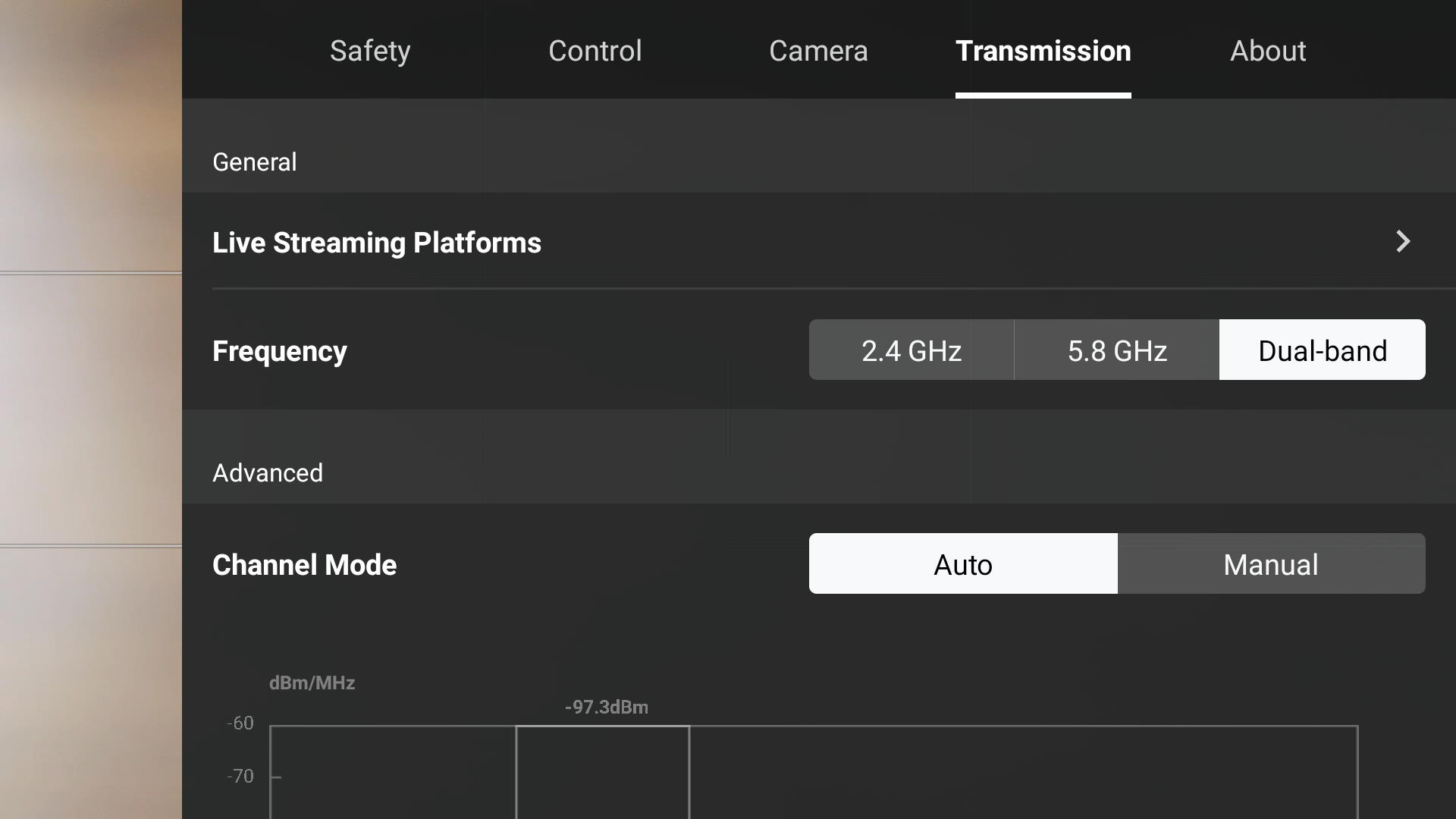
From the DJI Fly camera view, tap … to open settings, then Transmission → Live Streaming Platforms → RTMP. Livestreaming is under Transmission, not under Camera. The two tabs sit side by side, and Camera is the wrong turn.
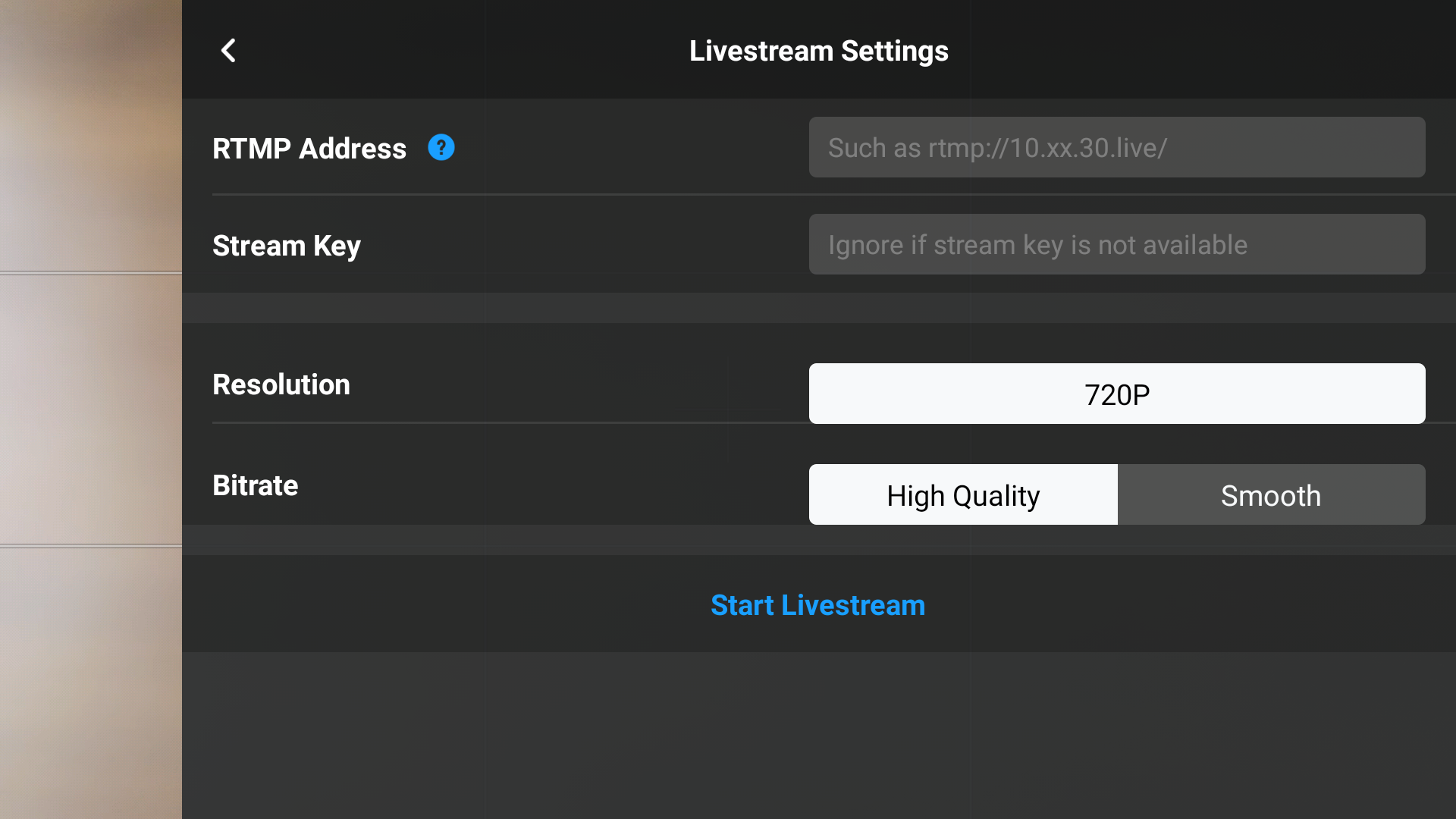
Enter the address in the RTMP Address field, set a resolution and bitrate, and tap Start; the app runs a 3-2-1 countdown before it goes live.
RTMP field format
DJI Fly shows two fields, an address and a key, and joins them with nothing in between. Nebli gives you the two values already separated, so there is nothing to split up on your end: copy RTMP Address into the address field, and the short pairing code shown as Stream Key into the key field. Keep them apart. Do not paste everything into one field, because DJI Fly joins the two with nothing in between and the stream fails silently. The address Nebli shows ends in a slash, and that slash is what keeps the two values from fusing. If you are setting the stream up in other software instead, such as OBS, open Using OBS or a tool that can paste? Show the ingest key for the key that tool expects.
On a phone controller (RC-N3 and the other remotes that use your phone), DJI Fly runs on the phone, so open this page on that same phone and copy the address from it rather than typing it. Applied to Nebli Drones: the two values are already separated for you, so each one is a single copy into its own box.
Encoding options
The app exposes a resolution and bitrate choice, described by DJI as fixed pick-lists rather than freely adjustable:
- Resolution: 1080p or 720p (the ceiling depends on which remote you're using; see the model table).
- Bitrate: on iOS, 2 Mbps or 1 Mbps; on Android, 5 Mbps or 3 Mbps.
DJI's documentation doesn't state a frame rate option or the video codec for this path, so neither is claimed here.
Gotchas that trip people up
- The original DJI RC cannot stream. It has a screen and looks fully capable, but DJI states it plainly in their own docs: no livestream from this remote. This affects some Mini 3, Mavic 3, Mavic 3 Classic, and Mavic 3 Pro kits, which are sold with a choice of remote.
- RC 2, DJI RC Pro, and DJI RC Pro 2 cap out at 720p due to hardware limits, per DJI's app documentation.
- DJI RC Pro and the DJI Smart Controller need a microphone plugged into the remote before streaming will start, per DJI's app documentation. The RC 2 and RC Pro 2 do not.
- The internet connection lives on the remote, not the drone. RC-N-series remotes (which have no screen) stream through a tethered phone's cellular or WiFi connection. Screen remotes (RC 2 / RC Pro / RC Pro 2) have no SIM slot and need their own WiFi hotspot.
- RTMP only, no RTMPS. A platform that requires RTMPS (Facebook, Instagram, TikTok) needs an external RTMPS relay in front of it (third-party, not ours); DJI Fly's RTMP field doesn't speak RTMPS directly. The ingest is plain RTMP, so this doesn't affect a Nebli Drones connection.
Pointing it at Nebli Drones
In the Nebli dashboard: Drones → + Add → A DJI drone → pick your model and give it a name → Register DJI drone. Nebli Drones shows two values for that drone: RTMP Address and Stream Key (a short pairing code). Copy each into its own DJI Fly field as described above, save, and start the stream. The drone goes live on its own page as soon as it streams, and you will see it in Live View.
This is the same RTMP-push path Nebli Drones uses for the enterprise Pilot 2 line: video only, no gimbal or flight-control binding. See the enterprise guide for the bench-verified stream measurements from a Matrice 4E; DJI hasn't published equivalent codec and bitrate specifics for the consumer line.
Model coverage
| Model | Remote | Max resolution | Evidence |
|---|---|---|---|
| Mini 3 | RC-N1 streams; DJI RC does not | 1080p | DJI-documented |
| Mini 3 Pro | RC-N1 streams; DJI RC does not | 1080p | DJI-documented |
| Mini 4 Pro | RC-N2 or DJI RC 2 | 1080p / 720p | DJI-documented |
| Mini 5 Pro | RC-N3, RC 2, or RC Pro 2 | 1080p / 720p | DJI-documented |
| Air 2S | RC-N1 or DJI RC Pro | 1080p / 720p | DJI-documented |
| Air 3 | RC-N2 or DJI RC 2 | 1080p / 720p | DJI-documented |
| Air 3S | RC-N3 or DJI RC 2 | 1080p / 720p | DJI-documented |
| Mavic 3 | RC-N1 or RC Pro streams; DJI RC does not | 1080p / 720p | DJI-documented |
| Mavic 3 Classic | RC-N1, DJI RC, or RC Pro; DJI RC does not stream | 1080p / 720p | DJI-documented |
| Mavic 3 Pro | RC-N1 or RC Pro streams; DJI RC does not | 1080p / 720p | DJI-documented |
| Mavic 4 Pro | RC 2 or RC Pro 2 only | 720p only | DJI-documented |
| Flip | RC-N3 or DJI RC 2 | 1080p / 720p | DJI-documented |
| Avata 2 (goggles) | Goggles 3 bridged to a phone | Not documented | Unconfirmed lead |
Region-gating and a per-model minimum DJI Fly app version aren't documented by DJI beyond a family-wide baseline; if streaming doesn't appear as an option, updating DJI Fly to the latest version is the first thing to try.
Common questions
Can I stream my DJI Mini, Air, or Mavic drone into Nebli Drones?
Yes, over custom RTMP from the DJI Fly app. Every standard DJI Fly drone (Mini, Air, Mavic 3, Mavic 4 Pro, Flip) shares the same RTMP menu, according to DJI's own operation guide. Enter the RTMP Address and the pairing code from Nebli as you would for any other RTMP destination.
Does the original DJI RC support live streaming?
No. DJI states plainly that the original DJI RC (the screen remote bundled with some Mini 3, Mavic 3, and Mavic 3 Classic kits) cannot stream. If your remote is a DJI RC, use the RC-N series or DJI RC Pro instead, or fly from a phone.
Can I stream a DJI Avata 2?
DJI's own documentation for the Avata 2 covers local Live View Sharing to a paired phone, not internet RTMP. An RTMP path via the goggles is reported by third parties but is not DJI-documented, so it isn't verified here.
Sources
"DJI Fly App Livestream Operation Guides," DJI Support (support.dji.com, customId en-us03400006727), accessed 2026-07-14 · "A Beginner's Guide to DJI Mavic 3 Classic," DJI Support (customId en-us03400007098) · DJI Flip, Mini 5 Pro, and Air 2S product spec and release-note pages, dji.com.
Flying a DJI enterprise drone instead?
Enterprise (Pilot 2) live streaming →