
DJI's Enterprise line (flown with the Pilot 2 app on an Enterprise remote) has a built-in custom livestream module that can push video straight to Nebli Drones. This guide covers the Pilot 2 menu path, what each protocol tab actually asks for, and how to point it at Nebli Drones.
Prefer not to type an RTMP address by hand? Enterprise remotes running Pilot 2 can also connect straight from the controller with just a work-email sign-in — see the RC adoption guide.
What you need: a DJI Enterprise drone running Pilot 2 (Mavic 3 Enterprise, Matrice 30 series, Matrice 300/350 RTK, or Matrice 4 series), an Enterprise remote (RC Pro Enterprise, RC Plus, or RC Plus 2 depending on model), an internet path on the remote (Wi-Fi, a 4G/LTE dongle or module, or USB tether, depending on the remote), and the drone added in Nebli Drones (Drones → + Add → A DJI drone). No FlightHub or Cloud API license is needed for a direct custom-RTMP push.
Bench-verified on Matrice 4E
Everything in this guide describing the Matrice 4E and RC Plus 2 is bench-verified: we ran it end to end on our own hardware on 2026-07-14, including a packet-level capture of the actual stream. Other Pilot 2 models share the same livestream module and menu, cited to DJI's own documentation; where DJI's docs are silent on a specific model, that's called out.
Finding the livestream settings
From the camera view, tap back (<) to the Pilot 2 home screen. The Cloud Service tile shows your current livestream configuration once one is set.
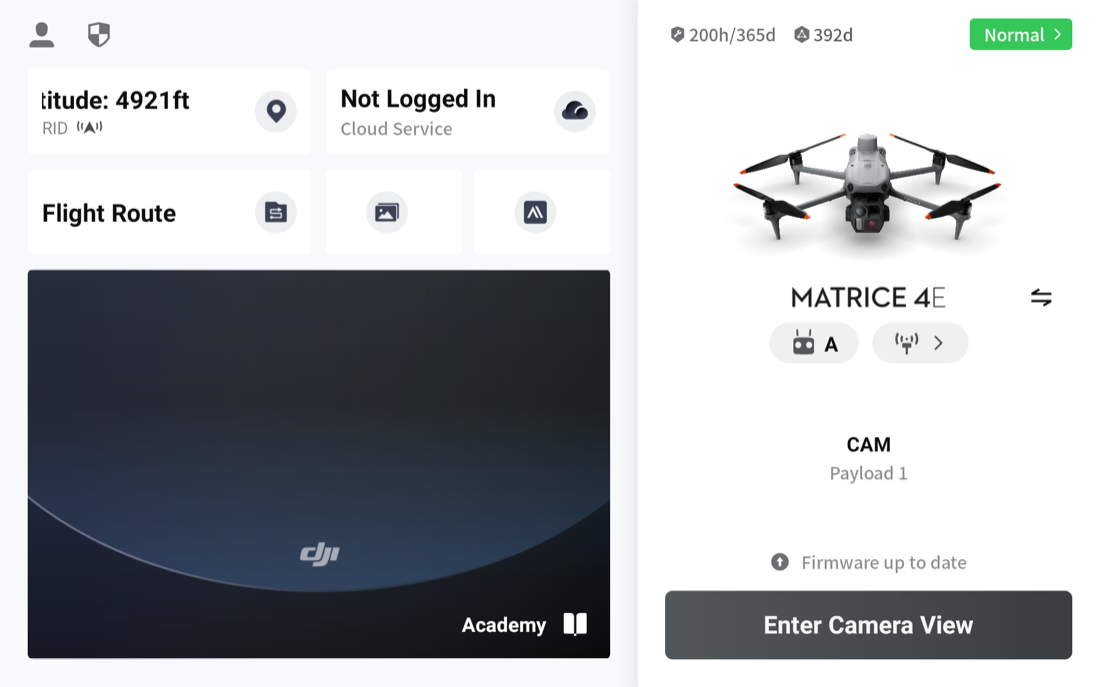
If nothing is configured yet, the tile reads "Not Logged In." Tap it to open the Cloud Services menu: FlightHub 2, FlightHub 2 On-Premises, Open Platforms, GB28181, and Customize Live Stream. Tap Customize Live Stream to reach the same editor.
The one counter-intuitive step: if a livestream is already configured and active, tapping the Cloud Service tile opens a summary screen, not the editor. Getting back into the editor to change anything requires tapping Exit in the top right, confirming "Exiting livestream will stop sending data to third-party platform. Exit?" with OK, which stops the current stream, and only then does the Customize Livestream editor open with its RTMP tab.
RTMP: custom livestream push
The RTMP tab is what Nebli Drones uses. It's a single field: one combined URL that carries both the destination server and the short code at the end of it.
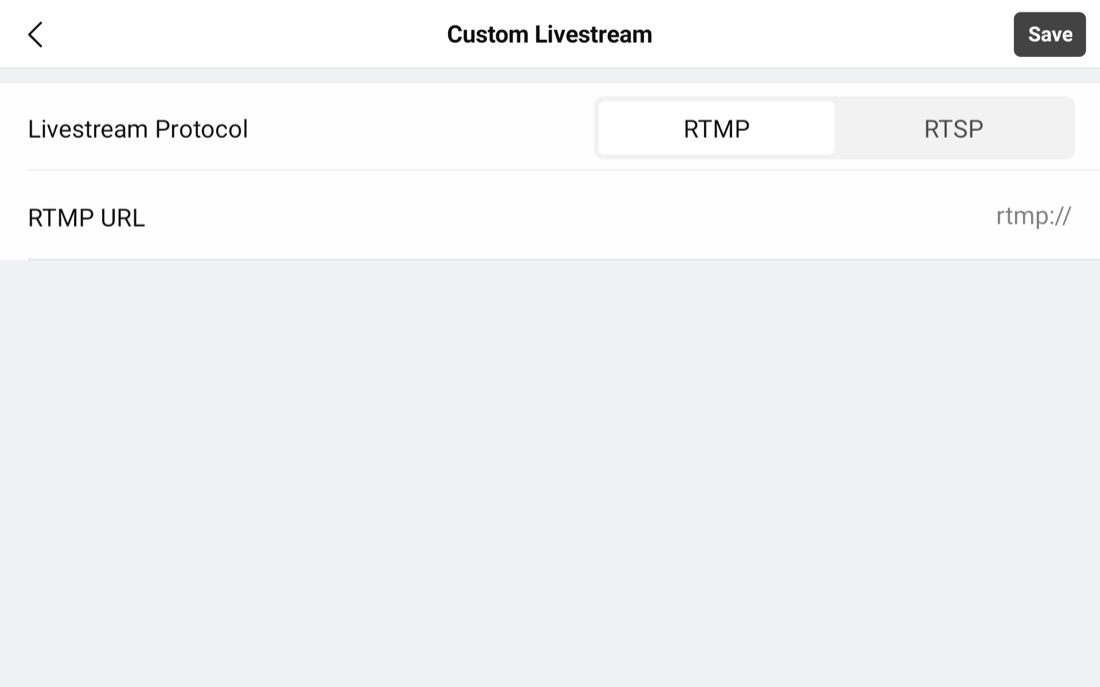
There is no separate stream-key field. The key is appended to the URL after a trailing slash, the same way DJI's own consumer-app documentation describes it (see the consumer guide for the verbatim wording): rtmp://host:port/stream-key.
Tap Save, then start the stream from the camera view. The livestream flyout shows the active protocol, the destination, and a live bitrate readout.
Bench-measured spec (Matrice 4E): H.264 High profile, 1280×720, about 30 fps, video only, FLV container. The in-app quality label reads "Adaptive," shown as 720P / 30FPS / 1.5M, but that 1.5 Mbps figure is a floor, not a ceiling: on a healthy connection we measured real throughput of roughly 9.5 to 14 Mbps. On other Pilot 2 models, DJI's own documentation states five selectable quality levels up to 1080p at 3 Mbps; frame rate and codec are not stated in DJI's docs for those models.
Pointing it at Nebli Drones
In Pilot 2's Custom Livestream screen, leave Livestream Protocol set to RTMP. The RTSP option beside it is a DJI push mode, not a way into Nebli, so do not select it. RTMP is one field, labelled RTMP URL and prefilled rtmp://, with no separate stream-key box.
The address you paste into that field comes from the Nebli dashboard: Drones → + Add → A DJI drone → pick your model → Custom RTMP → give it a name → Register DJI drone. Pick your actual model rather than DJI (other model): the reveal matches its layout to the model you choose, and DJI (other model) leads with DJI Fly's two boxes instead. If you land on those, your single address is behind Pilot 2 controller? Use the single address. Nebli shows an RTMP URL ending in a short pairing code.
That URL is the COMPLETE address. It looks like rtmp://ingest.nebli.ai/live/<code>. Copy the whole address into Pilot 2's single RTMP URL field. Do not add anything after it. If you are setting the stream up in other software such as OBS, open Using OBS or a tool that can paste? Show the ingest key for the key that tool expects. If you ever entered a cloud server address in Pilot 2 Cloud Service settings, that address is for binding your controller to Nebli, not for streaming. Do not paste it here. The streaming address is the one from Drones → + Add → A DJI drone in the dashboard.
Then save in Pilot 2 and start the stream. The drone goes live on its own page as soon as it streams, and you will see it in Live View.
This path is available and bench-verified end to end: drone → Nebli ingest → live video in the Nebli dashboard. It carries video only. Flight telemetry comes with controller sign-in instead (Adopt a DJI controller); gimbal and camera control stay on the controller either way.
Model coverage
DJI's custom-RTMP livestream module is shared across the Pilot 2 lineup. Coverage below is graded by evidence: bench-verified is our own hardware; DJI-documented is DJI's official enumeration of supported aircraft; DJI-silent means DJI hasn't published a per-model statement, though the aircraft shares the same livestream module.
| Model | Remote | Custom RTMP | Max stream | Evidence |
|---|---|---|---|---|
| Matrice 4E | RC Plus 2 | Yes | 720p measured, ~30 fps, 9.5–14 Mbps real | Bench-verified |
| Matrice 4T | RC Plus 2 | Shares the M4E module | Not separately documented | DJI-silent |
| Mavic 3 Enterprise | RC Pro Enterprise | Yes | 1080p / 3 Mbps | DJI-documented |
| Mavic 3T | RC Pro Enterprise | Yes | 1080p / 3 Mbps | DJI-documented |
| Mavic 3 Multispectral | RC Pro Enterprise | Shares the module | Not documented | DJI-silent |
| Matrice 30 / 30T | RC Plus | Yes | 1080p / 3 Mbps | DJI-documented |
| Matrice 300 RTK | Smart Controller Enterprise or RC Plus | Yes | 1080p / 3 Mbps | DJI-documented |
| Matrice 350 RTK | RC Plus | Yes | 1080p / 3 Mbps | DJI-documented |
| Matrice 400 | RC Plus 2 | Shares the module | Not documented | DJI-silent |
| Dock aircraft (M30/M3D/M4D series) | No remote, no Pilot 2 | No — Cloud API / FlightHub 2 only | 1080p ladder | DJI-documented |
Dock aircraft have no remote and no Pilot 2 app, so the in-app RTMP menu above doesn't apply to them. They stream through DJI's Cloud API and FlightHub 2, a different integration path this guide doesn't cover.
Common questions
Can I get a live feed from my DJI enterprise drone into Nebli Drones today?
Yes, over custom RTMP. Paste the RTMP URL Nebli Drones shows for your drone into the Pilot 2 app's custom RTMP field. This is shipped and bench-verified end to end on a DJI Matrice 4E. It carries video only; flight telemetry comes with controller sign-in.
Which DJI enterprise drones does this cover?
Any drone that runs DJI Pilot 2 on an Enterprise remote: the Mavic 3 Enterprise series, Matrice 30 series, Matrice 300/350 RTK, and Matrice 4 series. DJI Dock aircraft do not have a Pilot 2 app and are not covered; they stream through DJI's Cloud API and FlightHub 2 instead.
Flying a consumer DJI drone instead?
DJI Fly live streaming →